From a request a business posted
Work orders from email into the job system
A dispatcher retypes every work order email into the job system, field by field, before anyone can schedule it.
AI agents built by senior engineers
Most businesses run on a handful of systems that don't share information well: email, spreadsheets, accounting, scheduling, a portal or two. People fill the gaps by reading, retyping, matching and chasing. We build an AI agent that does that work alongside your team. It follows your company's rules from the first day, and it keeps getting better as your people adjust its work.
tenday.ai comes from ATX DevOps, an Austin consultancy whose senior engineers have built software for businesses since 2015.

The problem
Much of the day goes to information on a screen. People read email and attachments. They copy data between spreadsheets, portals and the systems the business runs on: accounting, CRM, scheduling, inventory. They check one source against another, chase what is missing, and make the routine calls.
The software you buy covers a generic slice. The specific, messy part runs on workarounds: a shared spreadsheet, copy and paste, or the one person who remembers how it works. When that person is out, the work stops.
General AI does not fix it alone. A chatbot has read a little about everything and nothing about your business. When it does not know your price list, it guesses. A guess is fine in a draft email. On an invoice, it costs money.
Use cases
Three of fourteen, each from a request a business posted. These are examples, not a menu. If a person does the work on a computer, whether in email, a website, a spreadsheet or by moving information between your systems, an agent could take it on.
From a request a business posted
A dispatcher retypes every work order email into the job system, field by field, before anyone can schedule it.
From a request a business posted
The bookkeeper codes every bank and card line by hand, then chases the owner about the charges nobody explained.
From a request a business posted
Month-end reconciliation of PODs and scale tickets against invoices, chasing lost paperwork and weights that do not match the load.
Your business's brain
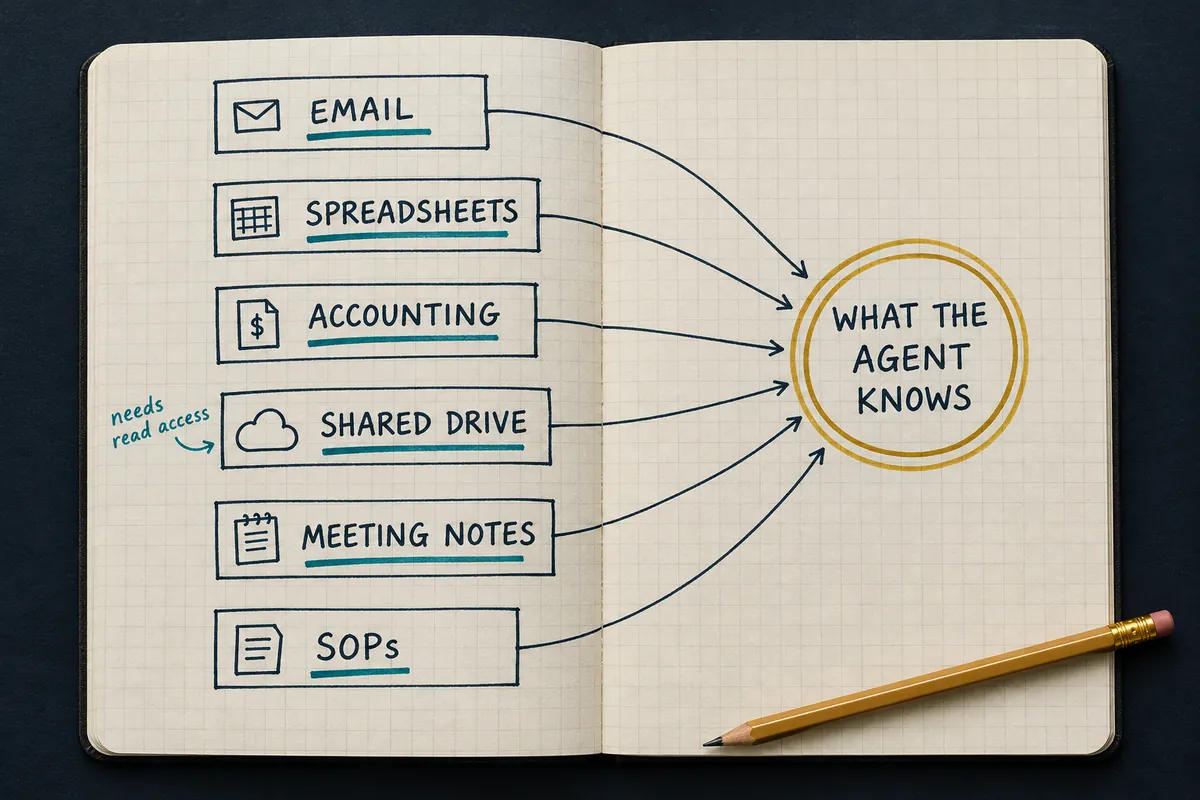
Your know-how is spread across systems, files, inboxes, meetings and the heads of your people. Before the build, we find where it lives. During the build, we gather it, check it, and cut what does not belong.
The agent works from that checked set, not from the whole internet. It shows where an answer came from, and it asks when it is not sure.
How it learns

With your team: in Slack, Teams or a text message. People send it work and answer its questions.
Behind the scenes: in your inbox, spreadsheets and business systems. It reads new email, enters data, matches records and sends follow-ups on its own, within limits you set. When something needs a decision, it brings in a person.
It already knows how your business does the job, so it does useful work from the first day. When someone on your team adjusts its work, the change is saved as a rule, an example or an exception, and the agent follows it next time. Your team decides what it learns. Small adjustments never fully stop, and that is normal: your work changes too. When it does not know something, it looks in your records and asks a person to confirm before it uses the answer.
At first, someone on your team reviews the agent's work before anything goes out. When it handles one type of task reliably, such as matching routine invoices, you can decide its work on that type no longer needs review. New, unusual and high-stakes work still goes to a person.
What it learns, and what it does not. It learns how your company does this job: which steps matter, which exceptions come up, and what finished work looks like. It does not watch, rate or profile your employees. Everything it learns is saved as plain-English notes. You can read all of them and delete any of them.
How we deliver
Many AI projects fail because the job was never a good fit for AI, not because the AI was bad. So before we build anything, we study one job. Does it come up often? Can the agent get to the information it needs? Can someone tell a good result from a bad one? We also measure how long the job takes today. If an agent is not the answer, or a cheap ready-made tool would do, we tell you.
Senior engineers write down how your team does the job and review the write-up with you. They build the agent and try it on your real past work until it passes tests you agreed to in advance. They also set its limits: what it does alone, what needs approval, what it records, and how to switch it off.
Your team starts using it. At first, someone on your team reviews the agent's work before anything goes out. We fix problems, adjust it as unusual cases come up, and compare the results with the numbers from the fit test.
Learning does not stop at ninety days. The person on your team who works with it keeps adjusting its work and handing it new kinds of cases, so it handles more over time. You choose who runs it. Your team can, with the source code, the tests and a guide. Or our engineers can, with a short monthly report. You also choose where it runs: on your own servers, in your own cloud account, or in our data center.
Compared with AI tools you set up yourself
Subscription assistants and agent builders sell access to a tool. Someone on your team still has to set it up, connect it, feed it, watch it and fix it.
We will tell you when a simple tool is enough. If a low-cost AI subscription can do the job, the first step says so, and you keep the map.
What you keep
You own the agent, the knowledge we gathered for it, what it has learned, and its tests. Run it yourselves or have us run it. Nothing sits in a black box.
Start with the work
Bring one costly piece of work. We will tell you whether an agent is the right answer. If it is not, we will say that too.
The first conversation costs nothing.

Prefer email? Write to jay@atxdevops.com.
Three short fields. We reply within one business day and use your details only to respond.